
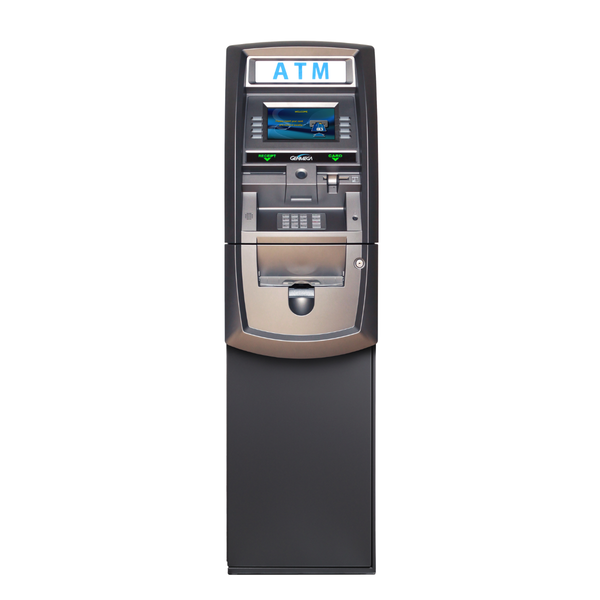

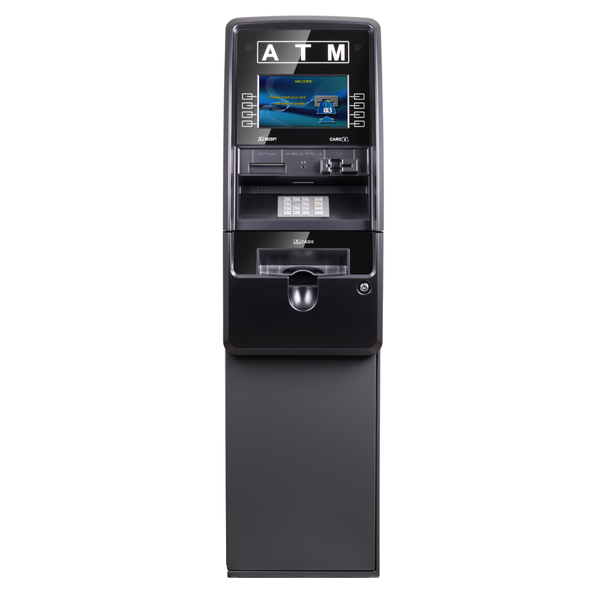
Which Genmega ATM models does this guide cover?
This guide applies to all current and recent Genmega retail and through-the-wall ATM models:
- G2500
- GT3000
- Onyx
- Onyx W
Hantle-branded units share the same platform and this guide applies to those as well. For model-specific error codes, check the service manual for your unit. The troubleshooting steps below are symptom-based and apply across models unless noted.
Why does my Genmega ATM say "Out of Service" and where do I start?
"Out of Service" is a catch-all status. The machine detected a fault and pulled itself offline. It does not tell you what failed on its own. The fastest way to find the root cause is the operator error log, not a service call.
- Enter the operator menu using your supervisor PIN.
- Navigate to Error Log or Fault History. The most recent code is your starting point.
- Look up the code in this guide or the Genmega error code list.
- Run the fix for that code, then select "Initialize" in the operator menu.
-
Take the machine out of supervisor mode and confirm it returns to the welcome screen.
If the operator menu is also inaccessible, the fault is at the controller or power supply level. Go to the "Won't Power On" section below.
My Genmega ATM just went out of service with no warning. What are the most common causes?
|
Cause |
Frequency |
Operator fix? |
|
Cash cassette empty or not seated |
Very common |
Yes |
|
Receipt paper out |
Very common |
Yes |
|
Host communication timeout |
Common |
Usually |
|
Note jam in transport |
Common |
Usually |
|
Card reader dirty or failing |
Moderate |
Cleaning only |
|
Reject cassette full |
Moderate |
Yes |
|
Hardware component failure |
Less common |
No |
My Genmega ATM won't turn on at all. What do I check first?
- Confirm the power outlet is live. Plug a different device into the same outlet to test.
- Check that the power cord is fully seated at both the wall and the ATM's power entry point.
- Locate the ATM's main power switch on the rear or inside the lower cabinet. Cycle it off, wait 10 seconds, and power back on.
- Check the ATM's internal fuse or circuit breaker if accessible. A tripped breaker inside the cabinet is a common cause of total power loss after a surge.
- If the machine receives power but the display does not light, the monitor may have failed independently of the main controller.
Do not probe the power supply board with a multimeter unless you are qualified. Line voltage is present inside the cabinet at all times when plugged in.
If steps 1 through 4 do not resolve it, the power supply needs replacement or bench diagnosis.
My Genmega ATM powers on but the screen stays black. Is this a software or hardware issue?
A black screen with a running machine usually means one of three things:
- Monitor connection issue: check the video cable from the main board to the display. Reseat if loose.
- Monitor failure: the backlight or panel has failed. The machine is operational but has no display output. Confirm by shining a flashlight at the screen at an angle to check for faint image.
- Application boot failure: the ATM software did not load. Check the journal tape for boot error messages from the last session.
Monitor or software failures require a technician or replacement parts.
My Genmega ATM card reader is not reading cards. What do I do?
- Run a magnetic head cleaning card through the card slot 2 to 3 times. Use an ISO-standard pre-saturated cleaning card.
- Inspect the card slot opening for physical obstruction, bent metal tabs, or a skimming device. A foreign object in the slot is more common than a component failure.
- Test with multiple cards from different banks. If only certain cards fail, the issue may be worn magnetic stripes on those cards, not your reader.
- Check the card reader cable connection at the main board. Power down before reseating.
- Run a card reader self-test from the diagnostics menu.
Genmega card readers should be cleaned every 1,000 transactions or monthly on high-volume sites. Most "card reader failures" are cleaning issues.
A card got stuck in my Genmega ATM. How do I get it out without damaging the reader?
Do not use tweezers, screwdrivers, or any metal tool to extract a card from the slot. You will damage the read head.
- Power down the ATM at the main switch.
- On most Genmega models, the card reader module can be accessed by removing 2 to 4 front bezel screws. Slide the module forward slightly.
- Manually rotate the card transport roller (visible on the module) to advance the card to the exit position.
- Reassemble, power on, and run a diagnostic self-test before returning the machine to service.
My Genmega ATM receipt printer is not printing. What do I check?
- Check the paper roll. Confirm it is loaded thermal-side out. Thermal paper only prints on the coated side. Scratch the paper with your fingernail to confirm the coated side darkens.
- Clear any paper jam at the cutter or exit. Remove the paper roll, clean the paper path, and reload.
- Run a printer self-test from the operator diagnostics menu. If the test print is blank, the paper is loaded thermal-side in. If the test print is uneven, the print head may be dirty or failing.
- Clean the print head with a lint-free swab lightly dampened with isopropyl alcohol. Allow to dry before printing.
Paper and cleaning issues are operator-level fixes. Print head replacement needed if self-test prints are faint after cleaning.
My Genmega ATM keeps losing connection to the host. What causes this?
Intermittent host connection on a Genmega ATM points to one of four areas:
|
Cause |
Where to check |
|
Unstable internet at the location |
Test the ISP connection independently. Check uptime with the ISP. |
|
Router or firewall blocking ATM traffic |
Confirm ports 443 or 8583 are open outbound. ATM traffic cannot pass through deep packet inspection. |
|
Host IP or terminal ID changed |
Verify host settings in the operator menu match current processor credentials. |
|
Ethernet cable or modem fault |
Swap the cable. If using a cellular modem, check signal strength and data plan status. |
My Genmega ATM shows a communication error but the internet connection is fine. What else could cause this?
If the internet is confirmed live, the next candidates are:
- Host IP address changed on the processor side without notification. Call your processor and confirm the current host IP and port.
- Terminal ID expired or deactivated. Processors occasionally deactivate inactive terminals. Confirm your terminal status with the processor directly.
- SSL certificate expired on the ATM software side. Some Genmega firmware versions require periodic certificate updates. Check with your software provider.
- Time/date mismatch on the ATM. If the ATM clock is significantly wrong, SSL handshakes will fail. Verify the system time in the operator menu.
Which Genmega ATM problems can an operator fix without a technician?
|
Issue |
Operator fix? |
Time needed |
|
Cash cassette empty or not seated |
Yes |
Under 5 min |
|
Receipt paper out or jammed |
Yes |
Under 5 min |
|
Reject cassette full |
Yes |
Under 5 min |
|
Card reader dirty |
Yes |
Under 10 min |
|
Note jam in transport |
Usually |
Under 15 min |
|
Host config mismatch |
Usually |
Depends on processor |
|
Power cycle / software reset |
Yes |
Under 5 min |
|
Card reader hardware failure |
No |
Tech required |
|
Dispenser module failure |
No |
Tech required |
|
Print head replacement |
No |
Tech required |
|
Power supply failure |
No |
Tech required |
|
Main board / controller failure |
No |
Tech required |
|
Cash discrepancy or count error |
No |
Tech + audit required |
How do I know when a Genmega ATM problem has gone beyond a DIY fix?
Stop troubleshooting yourself and call a certified technician when:
- The same error returns within one hour of clearing it
- The machine is recording cash transactions but failing to dispense (regulatory exposure)
- The error log shows codes you cannot match to a known fault
- The machine powers on but the dispenser, card reader, or display does not respond to diagnostics
- You see physical damage to any component inside the vault
Genmega ATM repair and field service
-
Southern California Genmega ATM field service
On-site technician dispatch for Genmega ATM repair across Los Angeles, Orange County, San Diego, and the Inland Empire. Same-day and next-day availability. Check Southern California field service ATM coverage and book a visit. -
ATM repair center
Submit a repair request for any Genmega model. Parts stocked for G1900, G2500, Onyx, and GT3000. Go to the Repair Center page and submit your request. -
Genmega ATM replacement parts
Rollers, card readers, print heads, cassettes, and power supplies in stock. Shop Genmega parts.